
Camera Blocker: Anti Spy Guard
BytePioneers s. r. o.Libraries & Demo
4.41.41K Reviews
- Version
- 2.42
- Installs
- 1.00M
- Age Rating
- Everyone
Screenshots

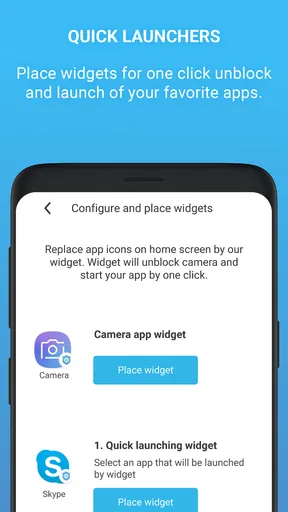
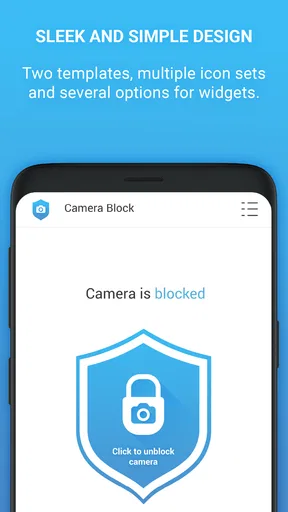
Our Review of Camera Blocker: Anti Spy Guard
 Analysis by Appyee
I think of Camera Blocker: Anti Spy Guard as a small, specific privacy tool rather than a complete security suite. Its central purpose is to give me a direct way to stop camera access when I do not need the camera. That is useful when my phone is sitting nearby during work, travel, or a quiet moment at home: instead of relying only on the hope that nothing is trying to use the lens, I can choose to block it.
Getting Started with Camera Blocker: Anti Spy Guard
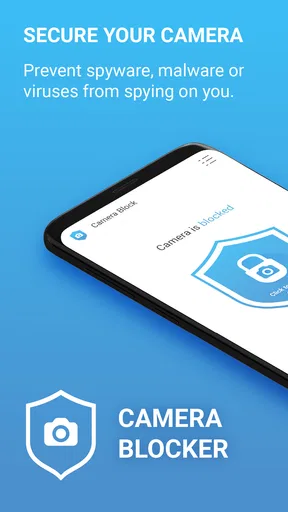
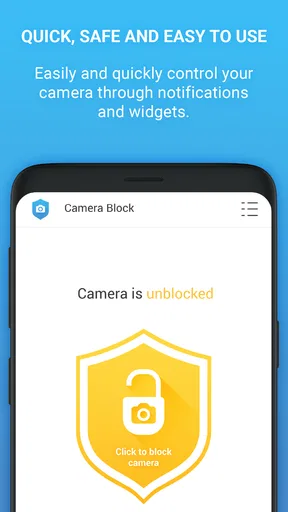
First things first, downloading and setting up Camera Blocker: Anti Spy Guard was a breeze. Just a quick hop to the app store, and I had it up and running in no time. The user interface is clean and intuitive, which is a huge plus for those of us who aren’t exactly tech wizards. Right from the get-go, you’ll notice the app’s dashboard—it’s straightforward, showing you the status of your camera’s accessibility.
Why a camera switch can matter
The value here is less about watching for every possible threat and more about having an understandable control over one sensitive part of the phone. Camera permissions in the operating system let me decide which apps are allowed to request camera access. A blocker serves a different everyday purpose: it gives me a convenient way to keep the camera unavailable when I want a firm pause, rather than reviewing permissions app by app each time.
That distinction matters. I would not treat a camera blocker as a replacement for sensible app permissions, system updates, or careful installation habits. It is an extra layer of control focused on the camera, not proof that the rest of the phone is secure. For someone whose concern is specifically an unwanted camera activation, though, a clear blocked or available state is easier to act on than a vague feeling of unease.
Using it without disrupting the day
One of the features I really appreciated is the app’s ability to block camera access with just a tap. It’s as simple as flipping a switch. When the camera is blocked, the app gives you a reassuring notification, so you always know when you’re safe from prying eyes. Additionally, it has a nifty whitelist feature, allowing certain trusted apps to access your camera even when the blocker is on. This is super handy if you’re on a video call or snapping a quick pic.
The practical choice is deciding when that convenience is worth keeping the blocker active. If I rarely use the camera, leaving it blocked for long stretches makes sense. If I move between video meetings, scanning something, and taking photos, I would need to remember to allow the camera when I want to use it. A blocked camera can otherwise look like a fault in the camera app or a problem with a call. Before troubleshooting, I would check the blocker’s state; that simple habit can save time and avoid changing unrelated phone settings.
The whitelist idea can help reduce that friction, but I would keep it deliberate. A trusted video-calling app may be worth allowing, while granting access broadly would weaken the point of using a blocker. I would review the exceptions whenever my needs change, rather than treating the list as something to set once and forget. The useful trade-off is convenience versus strictness: fewer exceptions mean tighter control, while carefully chosen ones make routine camera use smoother.
What the access log can and cannot tell me
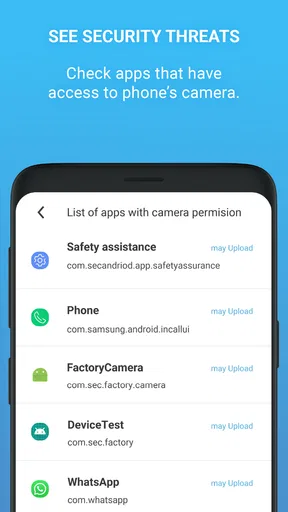
The app also provides a detailed log of recent camera access attempts. This means you can see which apps tried to sneak a peek, and when. It’s a great way to stay informed and make sure no naughty apps are trying to invade your privacy.
I would read an access entry as a prompt to investigate, not as a verdict that an app is spying. A camera request can have an ordinary explanation—for example, I may have opened a feature that uses the camera and forgotten about it. If an unfamiliar app appears, I would check whether I recognize it, look at its camera permission in the phone’s settings, and remove access if there is no good reason for it. The log is most helpful when it leads to a practical decision instead of unnecessary alarm.
There is also a small but meaningful workflow here: check the blocker first, then consult the log if something seems unusual, and finally review permissions for any app that deserves a closer look. That keeps the tool focused. It avoids treating every recorded attempt as evidence of wrongdoing while still giving privacy-conscious users something concrete to inspect.
Performance and Usability
In terms of performance, Camera Blocker: Anti Spy Guard works seamlessly in the background without hogging your phone’s resources. I didn’t notice any lag or battery drain, which is always a concern with security apps. Plus, the app is ad-free, meaning you won’t be bombarded with annoying pop-ups while trying to protect your privacy.
One thing I did notice is that the app occasionally requires a manual refresh to update the log, but that’s a minor inconvenience compared to the peace of mind it offers. The notifications are subtle and not intrusive, keeping the user experience pleasant and unobtrusive.
That refresh step is worth remembering if the log looks out of date. I would not make a decision based on a screen that may need updating; refreshing before drawing conclusions is a sensible check. Likewise, the blocker is most useful when its status is visible and understood. If I have just changed settings or allowed an app, I would confirm the current state before joining an important call rather than assuming the phone has returned to my preferred setup.
A realistic day with the blocker
Let’s talk about real-world usage. Imagine you’re at a café, working on your laptop with your phone beside you. There’s always that tiny fear in the back of your mind—what if someone’s watching? With this app, you just tap to block, and you’re good to go. It’s like having a little privacy guard in your pocket.
For a more practical version of that routine, I might block the camera before settling into a long stretch of work, then check the status before a scheduled video call. If I use a trusted calling app regularly, a carefully chosen exception may reduce interruptions; if I prefer the strongest simple boundary, I can leave exceptions off and unblock only when needed. Either approach works better when it is intentional. The app cannot decide which balance suits me, but it makes the choice easier to act on.
This also helps in shared or public settings where I want a quick, visible action rather than a lengthy permissions audit. It is not a substitute for covering the lens if I want a physical barrier, and it does not address microphones or other forms of tracking. Those are separate concerns. Its narrower scope is a strength when my goal is camera control, but a limitation if I am looking for one switch to protect every part of my privacy.
Where it fits among privacy options
Compared with the usual alternatives, such as changing camera access for each app in system settings, a dedicated blocker puts the action closer at hand and makes the blocked state easier to check. The operating system’s permission controls remain important because they determine which apps should have access at all. I see the two approaches as complementary: use permissions to decide who deserves access, then use the blocker when I want the camera unavailable more generally.
A physical camera cover is another option, and it has an obvious advantage: it does not depend on software. But a cover can be awkward on a phone, may interfere with using the camera, and cannot provide an access history. Conversely, an app is convenient to toggle but is still a software control. Someone who needs a hardware-level guarantee, or who wants to disable several sensors at once, should look for a different solution rather than expecting this camera-focused app to do everything.
For people who want broader protection, the better choice may be a careful review of system privacy controls and app permissions, possibly alongside other safeguards suited to their device. For people who mainly want a straightforward camera on/off routine, this narrower approach is easier to maintain than a complicated security dashboard. I would choose it for that focused job, not as an all-purpose antivirus or surveillance detector.
Who is likely to appreciate it
Whether you’re using your phone for work or play, knowing that your camera isn’t being accessed without your consent is a huge relief. The app is perfect for travelers, students, or anyone who values their privacy in public spaces.
I can also see it suiting people who lend their phone to someone briefly, keep it on a desk during sensitive conversations, or simply prefer the camera to stay unavailable between occasional uses. It may be less appealing to someone who takes photos constantly, depends on camera access across many apps, or dislikes checking a control before a call. That person may be better served by managing permissions in the phone’s settings and leaving the camera available to trusted apps.
Camera Blocker is a free app in the libraries and demo area, developed by BytePioneers s. r. o. It has a 4.5 average from around 18,000 ratings, and more than a million installs. It is rated for everyone, first appeared on September 19, 2013, and its current version is 2.17, with Android 6.0 as the minimum requirement. Optional in-app purchases range from $2.99 to $89.99 per item, so I would check what an offered purchase covers before paying; the core reason to consider the app is its camera-blocking role.
Final Thoughts
In the age of digital surveillance, Camera Blocker: Anti Spy Guard offers a simple yet effective solution to protect your privacy. It’s easy to use, doesn’t mess with your phone’s performance, and provides peace of mind knowing that your camera is under your control.
If you’re someone who’s a bit paranoid about privacy or just wants to take an extra precautionary step, this app is definitely worth a shot. So go ahead, give it a try, and rest easy knowing you’ve got an anti-spy guard in your corner.
My recommendation is to use it with a clear routine: keep permissions selective, decide which trusted apps genuinely need camera access, and check the blocker before an important camera task. That way, it becomes a practical boundary instead of another setting I forget about. If you want a simple way to keep the phone camera blocked when it is not in use, this app is worth considering; if you expect comprehensive device security or a hardware guarantee, I would choose additional or different protections.
Privacy and Permissions
See what permissions an app requests and how it handles your data.
- Camera
- take pictures and videos
- Other
- view network connections, full network access, run at startup, draw over other apps, prevent device from sleeping, install shortcuts
Verdict
Strengths of Camera Blocker: Anti Spy Guard
- Simple and intuitive interface.
- No ads to interrupt usage.
- Lightweight and fast performance.
- Doesn't require many permissions.
- Regular updates for security.
Limitations of Camera Blocker: Anti Spy Guard
- No advanced camera settings.
- Limited customer support options.
- Lacks a trial version.
- No cloud backup for settings.
- May block legitimate apps.
Other Releases by BytePioneers s. r. o.
View All
Microphone Blocker - Anti Spy
Libraries & Demo4.5
Similar Picks in This Category
View All
PGT: GFX, Launcher & Optimizer
Trilokia Inc.4.5

AusweisApp Bund
Governikus Service GmbH3.7

Cardboard
Google LLC3.2

Gamers GLTool with Game Tuner
Trilokia Inc.4.5

Multi Web Chat - Read Secretly
World Scan & Cleaner3.8

App Cloner Premium & Add-ons
App Listo1.9
Frequently Asked Questions
What is Camera Blocker: Anti Spy Guard and how does it work?
Camera Blocker: Anti Spy Guard is a privacy-focused app designed to protect your device from unauthorized camera access. It works by blocking apps and services from using your camera without your permission. By providing real-time alerts and maintaining a log of attempted access, it ensures your privacy is safeguarded against potential spying threats.
Is Camera Blocker: Anti Spy Guard easy to use for beginners?
Yes, Camera Blocker: Anti Spy Guard is designed with user-friendliness in mind. Its intuitive interface makes it accessible for users of all levels, including beginners. The app provides clear instructions and a straightforward setup process, allowing you to quickly activate its protective features and manage permissions with ease.
Does Camera Blocker: Anti Spy Guard affect the performance of my device?
Camera Blocker: Anti Spy Guard is optimized to run efficiently without significantly impacting your device’s performance. It operates in the background with minimal resource usage, ensuring that your device continues to function smoothly while maintaining high levels of security against unauthorized camera access.
Can I customize the settings in Camera Blocker: Anti Spy Guard?
Yes, Camera Blocker: Anti Spy Guard offers a range of customizable settings to suit your personal security preferences. You can configure which apps are allowed to access your camera and receive notifications for any blocked attempts. The app also allows you to adjust sensitivity levels for different security needs.
Is Camera Blocker: Anti Spy Guard available for both Android and iOS devices?
Camera Blocker: Anti Spy Guard is available for both Android and iOS platforms, ensuring a wide range of users can benefit from its privacy protection features. You can download it from the Google Play Store for Android devices and the Apple App Store for iOS devices, offering comprehensive protection across different operating systems.
